
By Lee Ussher –
Recently Facebook has released a number of new advertising methods for business Pages as well as many other new changes to Facebook Page Timelines. One change in particular that has quite a few small businesses confused is the ‘Promote’ button in their Facebook Page post box so I’m going to focus on why I think this will become very popular with small businesses as they start to understand it’s benefits more. The new feature to pay to post on Facebook Pages will help save time and simplify advertising for those short lived business promotions, such as weekly sales, discount offers or fans only competitions. It is also a great method to increase the visible reach of the post to the fan base as it ensures it stays in news feeds longer – which prior was reliant mostly on timed interaction.
One issue small businesses always found difficult was to work out strategies to ensure their posts got seen by as many of their fans as possible. Examples of these strategies have been:
★ what day to post,
★ what time to post,
★ adding an image to increase clicks and life of posts in feeds.

Earlier in the year a time saving strategy called ‘pinning’ would help keep a promotional post visible at the top of a business page for up to 7 days. But as much as this was a time saver for small businesses it wasn’t improving the reach of fans it was being delivered to unless they continually posted it again or timed adding comments underneath the original post to keep it in their fans news feed (where 80% of us catch up on what’s happening in Facebook World). Now by paying to increase the length of time the post stays in the news feed these promotional posts are more likely to be seen by more of their fans without the extra effort.
Another new change in Facebook Pages released at the same time – not by accident I’m sure – is the addition of displaying individual page posts ‘reach of fan’. This is not new feedback, it has always been available to Page Admins in their insights. Facebook needed businesses – particularly small businesses – to be more aware of what their average post reach was in order for them to understand the big advantages from paying such a small fee to increase their reach.
A common error a lot of small businesses make – even now – is to assume ALL your fans see ALL your posts. Realistically, unless it’s something exciting and potentially viral only on an average of 16% of your fan base EVER see your posts, this is likely to get worse as more and more businesses start creating a presence in Facebook and many small businesses get lost in the crowd of more interactive pages that their fans follow. By placing the reach percentage under the individual page posts, businesses are now made more aware of what type of posts are working better than others.

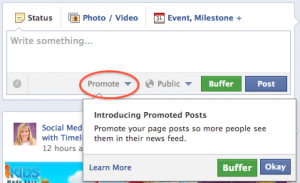
 So, now that I’ve covered how and when small businesses can benefit from a pay for posting on Facebook pages method, lets look at how to use it. Here is an image of Facebook Page’s post box where you will find the option to promote underneath.
As you can see when you click “Promote”, you will have the option to pay $5 or $10 to increase your posts reach of fans. Facebook can only give you an estimate of the potential reach as they have no control how often your fans will actually visit Facebook over the period of promoting the posts for you.
 Once you have selected the amount you are prepared to pay, click on the “More Options” and you will see the duration is set to expose your post in your fans news feeds for the next 3 days. If you already have a Facebook Ad account you will also see your default payment option information pulled in also. This means you don’t have to go through the trouble of selecting all the detailed criteria like you do when creating a Facebook Ad for a short promotion, and makes the process quicker for you.

 The little cog wheel in the bottom left hand corner is full of useful links. Such as to change your payment method or access the help center if you want to understand more about using the Facebook Post Promotion tool. If you have any bugs or problems then you have the option to send Facebook feedback also.
If you cannot see the option to pay for a post promotion underneath your post box then it isn’t a bug, it just means your following is too low to justify paying to promote to your fans in their feeds yet. To read more or watch a video about promoting page posts you can go to the help center.
Let me know below in the comments if you have any questions about using the pay for post on Facebook Pages. I would also love any businesses to share their feedback, on how it may have increased your reach on any posts, if they have been using the new promoting posts feature. I really do see this being a great way for small businesses not to lose their voice amongst the more heavily trafficked posts from big branded pages people follow.
Another change you might want to read more about is how you can set the various Facebook admin roles to increase the security of your Facebook page if you are considering getting someone to help you but don’t necessarily want them to have full access.

